Clean up QuickBooks Excel and CSV exports, automatically.
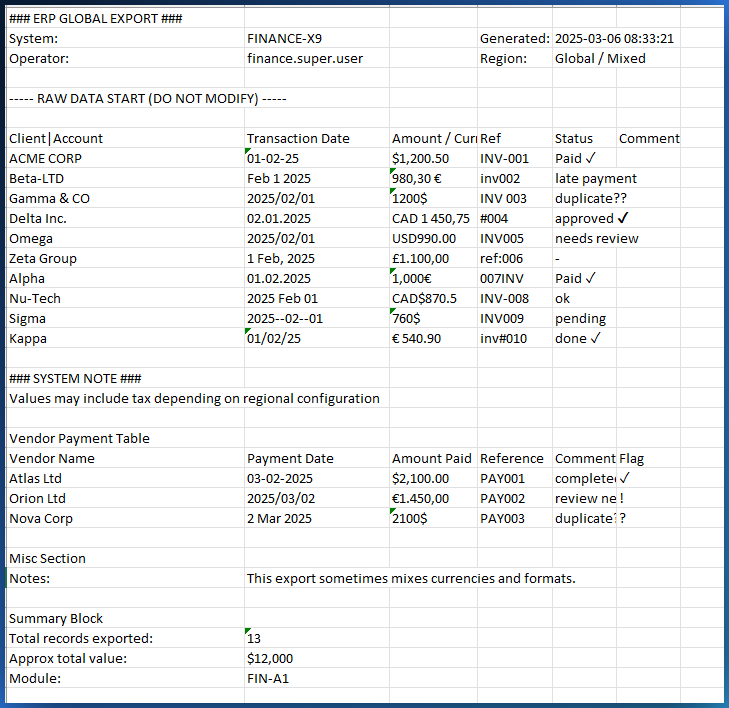
You export a report from QuickBooks and the file is a disaster: broken accents, duplicate rows, dates in three formats. CleanSheet fixes everything automatically in your browser. No file is ever uploaded.
Last updated: March 5, 2026
Why QuickBooks exports are always messy
Broken accents and garbled characters
You export a QuickBooks report as CSV, open it in Excel, and all French accents are broken. 'Reference' becomes 'Référence'. Vendor names with accents are unreadable. You spend 20 minutes fixing them one by one.
Duplicate rows and blank lines
QuickBooks adds subtotal rows, section separators, and blank lines. When you import this data elsewhere or build a pivot table, duplicates skew all your totals.
Dates and amounts in inconsistent formats
The same QuickBooks report contains dates in MM/DD/YYYY and DD-MM-YYYY. Amounts sometimes use a comma, sometimes a period as the decimal separator. Excel can no longer calculate correctly.
Formatting that breaks formulas
QuickBooks exports amounts as text instead of numbers. Columns contain invisible whitespace. When you use SUM, the result is wrong or Excel shows an error.
CleanSheet cleans your QuickBooks exports in 30 seconds
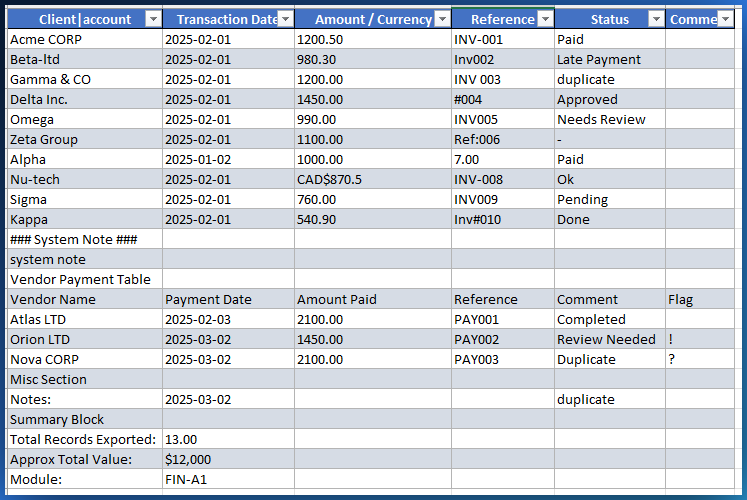
Drop your Excel or CSV file exported from QuickBooks. CleanSheet detects and fixes all problems automatically: accents, duplicates, dates, numbers. You download a clean file, ready for your calculations, imports, or pivot tables.
Accent repair
Detects French accents broken by the QuickBooks export and restores them: é, è, ê, ç, à, ù, and all the rest.
Duplicate and blank row removal
Removes duplicate rows, blank rows, and empty columns. Your totals become correct immediately.
Date standardization
Converts MM/DD/YYYY, DD-MM-YYYY, 'Jan 15 2026' and every other format into a single consistent format.
Amount normalization
Amounts exported as text become real numbers. Thousand and decimal separators are standardized. Your SUM formulas work.
Works with every version of QuickBooks
CleanSheet accepts all Excel (.xlsx) and CSV files, no matter which version of QuickBooks you use.
QuickBooks Online
Report exports, transaction lists, General Ledger, trial balances, and custom reports.
QuickBooks Desktop
IIF, CSV, and Excel exports from QuickBooks Pro, Premier, and Enterprise.
Also: Sage, Xero, Wave
CleanSheet works with exports from any accounting software. The same encoding and formatting problems exist everywhere.
Your financial data never leaves your computer
No files uploaded
Your QuickBooks export never leaves your computer. No server ever sees your transactions, balances, or client data.
Works offline
After loading, disconnect from the Internet and keep cleaning files. No network dependency.
No account required
No sign-up, no password, no tracking. You open the page and start.
Quick answers
Why are my QuickBooks Excel exports messy?
QuickBooks exports often produce broken accents (especially for French), inconsistent date formats, duplicate transaction rows, and extra blank rows or columns. These issues come from encoding mismatches and the way QuickBooks formats its reports.
How do I fix broken accents in a QuickBooks CSV export?
CleanSheet automatically detects and fixes broken accents caused by encoding issues. Drop your QuickBooks CSV, click Clean, and garbled characters like 'Référence' are restored to their correct form. No manual editing.
Can I clean a QuickBooks export without uploading it?
Yes. CleanSheet runs 100% in your browser. Your QuickBooks file never leaves your computer. No server ever sees your financial data.
Does it work with QuickBooks Online and Desktop?
Yes. CleanSheet works with any Excel (.xlsx) or CSV file, whether it came from QuickBooks Online, QuickBooks Desktop, or QuickBooks Self-Employed.
Ready to clean your QuickBooks export?
Drop your Excel or CSV file exported from QuickBooks and get a clean file in 30 seconds. No file is ever uploaded.
Try CleanSheet