Clean messy Excel and CSV data, automatically.
Drop an Excel or CSV file exported from QuickBooks, Sage, or any other software. CleanSheet fixes broken accents, removes duplicates, and standardizes dates and numbers. Everything happens in your browser.
Last updated: March 5, 2026
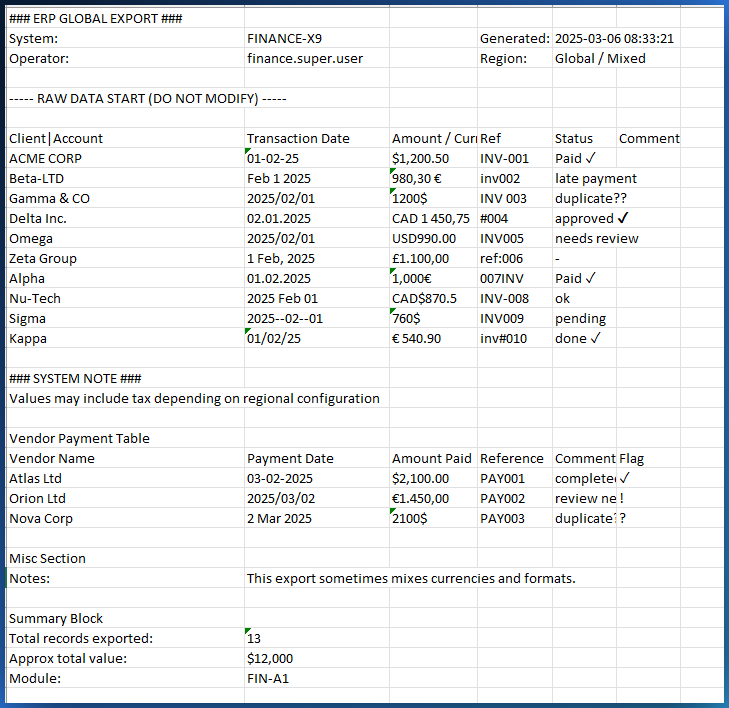
Excel and CSV exports are never clean
Broken accents and garbled characters
Exports from QuickBooks, Sage, and other software turn French accents into garbled characters. 'Reference' becomes 'Référence'. You fix them by hand, cell by cell.
Duplicates and empty rows
Duplicate rows that skew your totals. Empty rows that break your formulas. Blank columns that clutter your spreadsheet.
Dates and numbers in inconsistent formats
01/15/2026, 15-01-2026, and Jan 15 2026 in the same file. Amounts with commas, periods, spaces. Excel no longer knows what to do with them.
CleanSheet cleans your file automatically
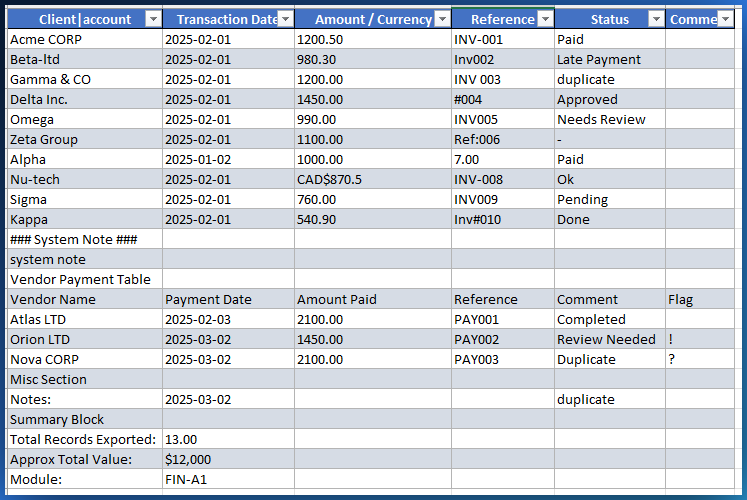
Drop your file, click Clean. In 30 seconds, accents are fixed, duplicates removed, and dates and numbers standardized. You download a clean file.
Accent repair
Automatically detects and fixes French accents broken by CSV and Excel exports.
Duplicate removal
Identifies and removes duplicate rows so your totals are correct.
Date standardization
Converts all date formats into a single consistent format throughout the file.
Number normalization
Standardizes thousand and decimal separators so your numbers are calculable.
Works with Excel and CSV files
Excel files (.xlsx)
Drop an Excel file: CleanSheet analyzes every column and applies corrections automatically.
CSV files
CSV files exported with the wrong encoding are detected and fixed automatically. UTF-8 and Latin-1 supported.
Why local processing protects your data
No files uploaded
Your file never leaves your computer. All processing happens in your browser.
Works offline
After loading, disconnect from the Internet and keep cleaning files.
No account required
No sign-up, no password. You open the page and start.
Quick answers
How do I clean messy Excel data without uploading it to the cloud?
CleanSheet runs 100% in your browser. Drop your Excel or CSV file, click Clean, and download the result. Your file never leaves your computer.
What problems does CleanSheet fix?
CleanSheet fixes broken accents and encoding issues, removes duplicate rows, standardizes date and number formats, removes empty rows and columns, and trims extra whitespace.
Does CleanSheet work with CSV files?
Yes. CleanSheet supports both Excel (.xlsx) and CSV files. It auto-detects the file format and applies the right cleaning operations.
Ready to clean your file?
Drop your Excel or CSV file and get a clean file in 30 seconds. No file is ever uploaded.
Try CleanSheet