Your accounting software exports broken data. We fix it.
QuickBooks, Sage, Xero, and bank portals export files full of metadata rows, garbled text, mixed date formats, and inconsistent numbers. These free tools clean them in seconds, right in your browser.
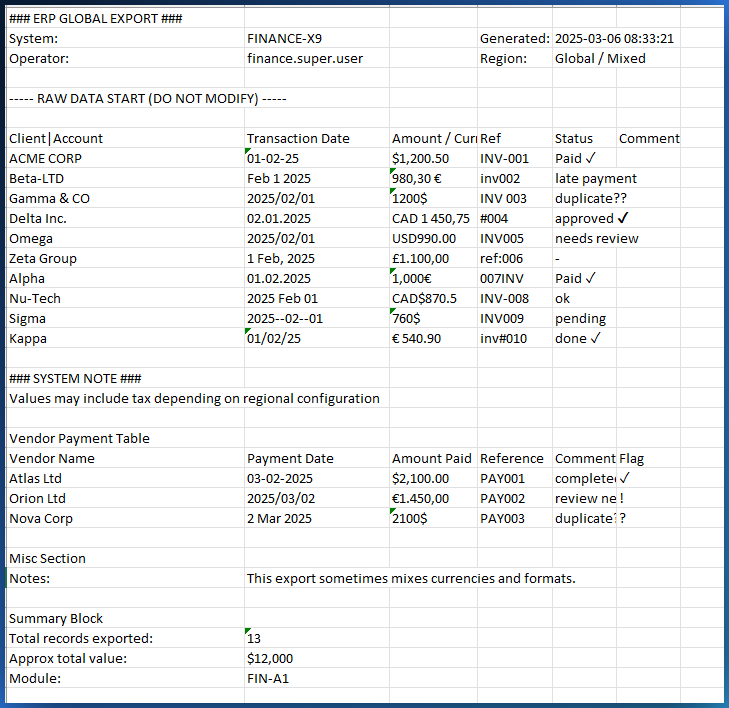
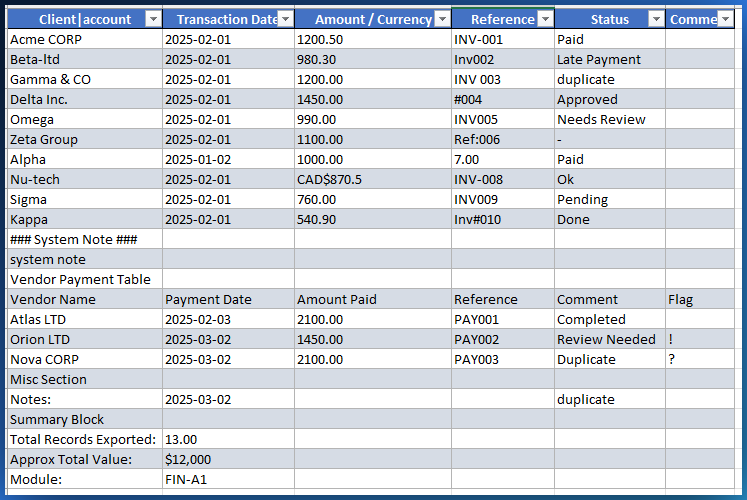
The problem every accountant knows
You download an export from your accounting software or bank. You open it in Excel. And you spend the next 30 to 90 minutes fixing it before you can actually use it.
Metadata rows before the data
Bank name, account number, report title, blank rows, all sitting above your transactions. Every sort, filter, and pivot breaks. You delete them manually every single time.
Mixed and broken date formats
DD/MM/YYYY, MM/DD/YYYY, 'March 15, 2026', sometimes all in the same column. Excel guesses wrong. Your date filters return garbage. You convert them one by one.
Date and description in one cell
'2026-02-15 - Wire transfer from Acme Inc.' in a single column. You cannot sort by date. You cannot search by description. You write TEXT formulas to split them. Every month.
Inconsistent number formats
'1 234,56 $' next to '$1,234.56' next to 'CAD 1234.56'. SUM returns an error. You find-and-replace currency symbols, then fix separators, then pray nothing broke.
Garbled accents and characters
'Reception' becomes 'Réception'. Client names turn into gibberish. 'Quebec' becomes 'Québec'. UTF-8 encoding issues that Excel does not fix on its own.
Summary rows mixed with transactions
Subtotals, running balances, page break markers scattered throughout. They look like data rows but they are not. Your totals are wrong until you hunt and delete each one.
See the difference in 30 seconds
A real bank statement export. Left: what your bank gave you. Right: after one click in CleanSheet.
Account: 0012-345-678
Period: Jan to Mar 2026
01/15/2026 - Rent $2,500.00
2026-01-20 - Payroll 8 500,00 $
Feb 3, 2026 | Insurance 1.200,00
2026-02-28 - Utility CAD 345.67
Subtotal: 12,545.67
2026-01-15 Rent 2500.00
2026-01-20 Payroll 8500.00
2026-02-03 Insurance 1200.00
2026-02-28 Utility 345.67
Five free tools that replace hours of manual cleanup
Each tool solves a specific pain. All run in your browser. No installation, no account, no cloud upload. Your financial data stays on your machine.
CleanSheet
Clean messy Excel and CSV exports in 30 seconds. The core tool that fixes everything above: metadata rows, mixed dates, merged columns, inconsistent numbers, garbled accents.
Open CleanSheet → Free tierDataVariance
Compare two Excel or CSV files row by row. See every added, removed, and changed row instantly. Built to reconcile exports across months or between systems.
Open DataVariance → Free tierPDFTable
Extract transaction tables from PDF bank statements to Excel or CSV. Handles multi-page statements and separates totals and balances from real transactions.
Open PDFTable → Free tierAynalyx
Drop a financial dataset and get instant anomaly detection. Spot duplicate transactions, outlier amounts, and suspicious patterns that manual review would miss.
Open Aynalyx → 100% freeMubsira Business
Invoice clients, track expenses, manage documents. When tax season arrives, export one clean file for your accountant. Works offline, no sign-up.
Open Mubsira Business →Three steps, no installation
Drop your file
Drag and drop any Excel (.xlsx, .xls) or CSV file into the tool, or a PDF bank statement into PDFTable. Your file stays on your device.
Pick what to fix
Enable table detection, date standardization, number normalization, accent repair, or just leave the smart defaults on. One click.
Download the clean file
Get your fixed file as CSV, Excel, PDF report, or JSON. Every change is logged in a report you can audit cell by cell.
Why not just use Excel?
You could. Here is what that looks like next to a purpose-built cleanup tool.
| Task | Manual in Excel | Mubsira tools |
|---|---|---|
| Remove metadata rows from a bank export | Find where data starts, select, delete, every file | ✓ Automatic table detection |
| Split a combined date and description column | Write LEFT/MID/FIND formulas, debug edge cases | ✓ One-click column split |
| Standardize mixed date formats | Manual conversion, one by one, guessing DD/MM vs MM/DD | ✓ Auto-detect region, convert all |
| Normalize currency and number formats | Find-and-replace symbols, fix separators, check totals | ✓ Strip symbols, normalize separators |
| Fix garbled accents (UTF-8 issues) | Re-import with correct encoding, hope for the best | ✓ Automatic mojibake repair |
| Compare two versions of an export | VLOOKUP, conditional formatting, manual review | ✓ Drop two files, see every change |
| Time per file | 30 to 90 minutes | Under 30 seconds |
Everything you need to know
Why are QuickBooks and Sage exports so messy?
Accounting software exports are designed for display, not analysis. They include report headers, subtotals, formatting codes, and use the locale settings of the server that generated them, which often differ from your local Excel settings. The file looks fine on screen but breaks when you sort, filter, or import it elsewhere.
Is my financial data safe? Where does it go?
Nowhere. Every tool runs 100% in your browser using JavaScript. Your files are processed locally on your device. Nothing is uploaded, nothing is stored, nothing is transmitted. You can verify this by disconnecting from the internet and using the tools, they still work.
What accounting software exports do these tools support?
Any software that exports to Excel (.xlsx, .xls) or CSV. That includes QuickBooks Desktop and Online, Sage 50 and Sage Intacct, Xero, Wave, FreshBooks, Zoho Books, bank portal downloads, PayPal reports, and any ERP or CRM that can export spreadsheets.
Do I need to create an account?
No. There is no sign-up, no login, no email required. Open the tool and use it. The free tier of CleanSheet handles up to 100 rows. The one-time Pro upgrade ($49) removes the row limit permanently.
What makes this different from Power Query or Google Sheets?
Power Query is powerful but requires setup, scripting knowledge, and does not solve encoding issues or smart table detection out of the box. Google Sheets requires uploading your data to Google's servers. Mubsira tools are zero-setup, zero-upload, and purpose-built for the specific problems accounting exports have. Drop a file, click clean, download the result.
Stop spending an hour cleaning every export
Drop your messiest QuickBooks, Sage, or bank statement file. See the difference in 30 seconds. Free, no sign-up, no upload.
Clean a file, free