Convert a bank statement PDF to Excel or CSV.
Drop your bank's PDF statement. Transactions are extracted, totals and balances are separated automatically, ready to export to Excel or CSV. Everything happens in your browser, no file is ever uploaded.
Last updated: March 5, 2026
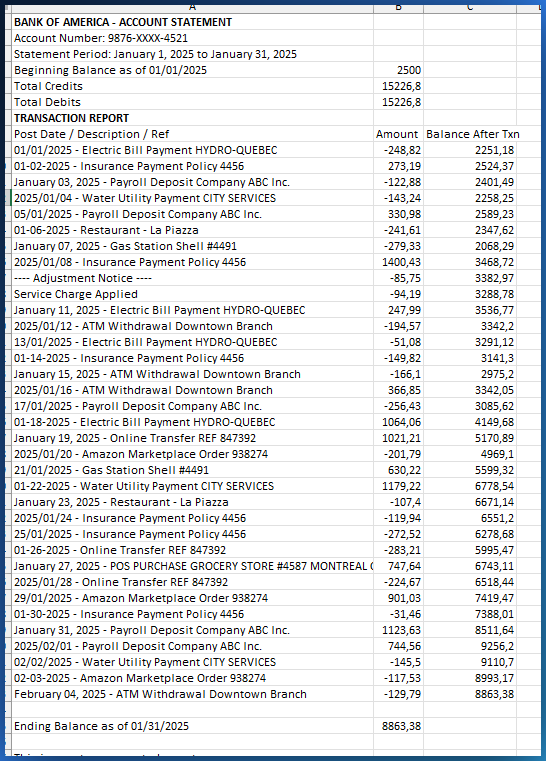
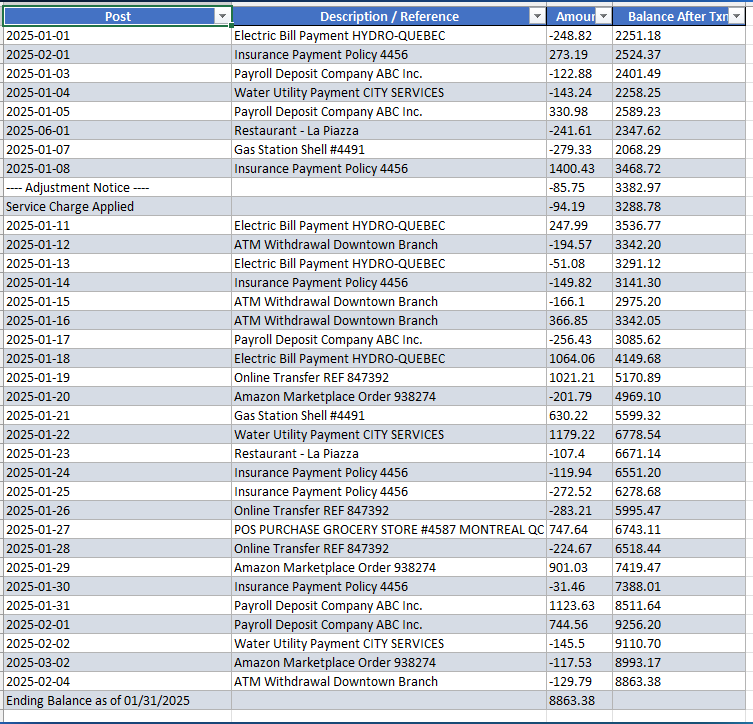
Why copying a PDF bank statement into Excel is a nightmare
Copy-paste scrambles everything
You select the transaction table in your PDF statement, paste into Excel, and the Date, Description, and Amount columns end up scrambled into a single column. You spend 30 minutes re-sorting by hand.
Multi-page transactions get split
Your statement is 5 pages long. Each page has headers and footers with running balances. When you copy, headers mix with transactions and balances distort your totals.
Online tools want your banking data
Online PDF converters ask you to upload your bank statement to a server. These are your transactions, your balances, your account number. That is a major security risk.
PDFTable extracts your transactions automatically
Drop your PDF bank statement. PDFTable detects the transaction table, merges pages, separates totals and balances, and gives you a clean Excel or CSV file with properly aligned Date, Description, and Amount columns.
Automatic transaction detection
PDFTable analyzes the position of every text element to reconstruct Date, Description, and Amount columns with precision.
Multi-page merging
Transactions spanning 5, 10, or 20 pages are merged into a single table. Repeated headers are ignored automatically.
Total and balance separation
Total lines, subtotals, and closing balances are detected and separated from individual transactions.
Confidence scoring
Every extracted table receives a quality score. Uncertain cells are highlighted so you can review before exporting.
Works with all PDF bank statements and financial reports
PDFTable works with statements from all banks that generate PDFs with selectable text. No OCR: the PDF must contain text, not scanned images.
Canadian banks
RBC, TD, BMO, Scotiabank, Desjardins, National Bank, CIBC, and all credit unions.
US banks
Chase, Bank of America, Wells Fargo, Citi, and all banks that generate PDF statements.
International banks
Any PDF bank statement with selectable text, regardless of bank or country.
Credit card statements
Visa, Mastercard, Amex: credit card PDF statements with their transactions, interest charges, and minimum payments.
PayPal and platform reports
Transaction reports downloaded from PayPal, Stripe, Square, and other payment platforms in PDF format.
Your banking data never leaves your computer
No files uploaded
Your bank statement never leaves your computer. No server ever sees your transactions, balances, or account number.
Works offline
After the page loads, disconnect from the Internet and keep extracting transactions. No network dependency.
No account required
No sign-up, no password, no tracking. You open the page and start.
Clean and compare your banking data
Once your transactions are extracted, use the other Mubsira tools to clean, compare, or analyze them.
Clean the data
Use CleanSheet to fix broken accents and standardize dates in your exported transactions.
Open CleanSheet →Compare periods
Use DataVariance to compare this month's transactions with last month, or quarter over quarter.
Open DataVariance →Detect anomalies
Use Aynalyx to spot suspicious transactions, duplicates, or unusual amounts.
Open Aynalyx →Quick answers
How do I convert a PDF bank statement to Excel without uploading it?
PDFTable runs 100% in your browser. Drop your PDF statement: the tool detects the transaction table, separates totals and balances, and lets you export to Excel or CSV. Your file never leaves your computer.
Does it work with multi-page statements?
Yes. When a transaction table spans multiple pages, PDFTable detects the continuation and merges all rows into a single complete table.
Which banks are supported?
Any PDF bank statement with selectable text: Desjardins, RBC, TD, BMO, Scotiabank, National Bank, CIBC, plus US and international banks. PDFTable does not use OCR, so image-only scanned statements are not supported.
Is it safe to convert my bank statement?
Most online converters upload your file to their servers. PDFTable is different: everything happens in your browser. Your statement never leaves your computer, and no server ever sees your transactions, balances, or account number.
Ready to convert your bank statement?
Drop your PDF bank statement and get your transactions in Excel or CSV in seconds. No file is ever uploaded.
Try PDFTable for freeOther solutions for your data
PDF to Excel
Extract tables from any PDF: invoices, financial reports, and more.
Open →Guide: extract tables from PDF
Complete guide to extracting tables from any PDF to Excel: methods, mistakes, and solutions.
Open →Clean Excel data
Fix accents, remove duplicates, and standardize dates after extraction.
Open →