CleanSheetSmart

Clean messy Excel & CSV files in seconds.
No code. No upload. 100% private.

100% browser-based
Under 60 seconds
No account needed
The Problem

Every team wastes hours cleaning spreadsheets

You receive an export from an ERP, a bank, a CRM, or a government portal. Before you can do anything useful, you spend 30 to 90 minutes fixing it by hand.

Garbled text

"émilie Tremblay" instead of "Émilie Tremblay". Encoding breaks every time you export from legacy systems.

Mixed date formats

Some columns use MM/DD/YYYY, others DD/MM/YYYY, others "Jan 15, 2024". Good luck sorting that.

Messy currency values

"$1,234.56", "1 234,56 €", "USD 990.00" all in the same column. Your pivot table breaks.

Hidden duplicates

Rows that look identical but have trailing spaces, different casing, or invisible characters.

Junk rows & headers

Bank statements with 15 rows of metadata before the actual data starts. Report footers mixed in.

Typos in categories

"Nroth America", "North Amrica", "north america". Same thing, three spellings.
Real Example

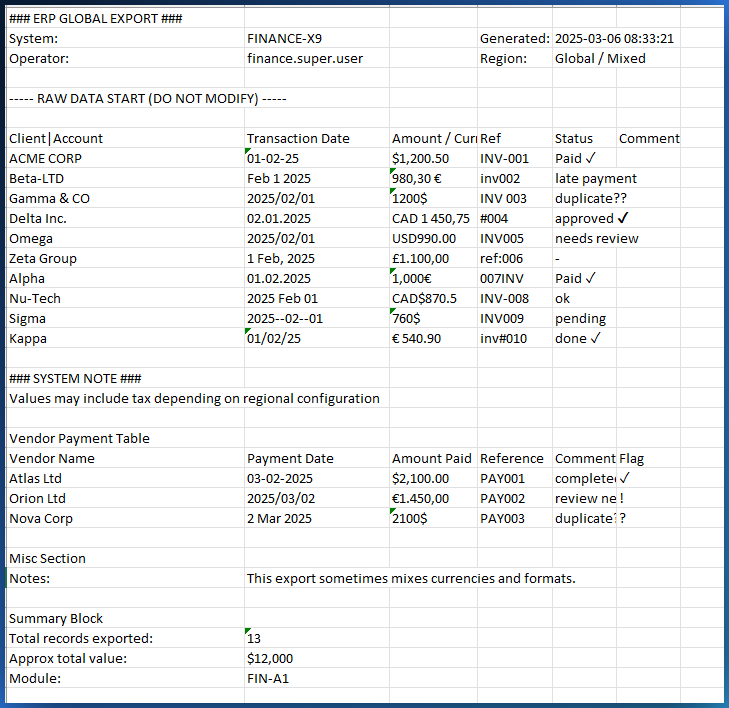
A real financial export, before CleanSheet

This is what a typical ERP export looks like when you open it. Garbled text, mixed dates, broken numbers, duplicates everywhere.

Raw messy spreadsheet with encoding issues, mixed formats, and duplicates
A real-world ERP export: garbled characters, mixed date formats, inconsistent numbers
47
Encoding issues
3
Date formats mixed
12
Hidden duplicates
90 min
Manual fix time
The Solution

CleanSheetSmart fixes it all automatically

Upload your file. Pick your cleaning options. Click one button. Done.

1

Upload

Drag & drop your CSV or Excel file. No account.

2

Configure

Choose what to clean: encoding, dates, numbers, duplicates.

3

Review

See every change logged. Accept or reject smart suggestions.

4

Export

Download clean data as CSV, Excel, PDF report, or JSON.

Cleaning Options

Basic cleanup options
Basic cleanup: empty rows, duplicates, whitespace
Number and date options
Numbers & dates: currency, format, rounding
Under the Hood

No black box. Every fix is transparent.

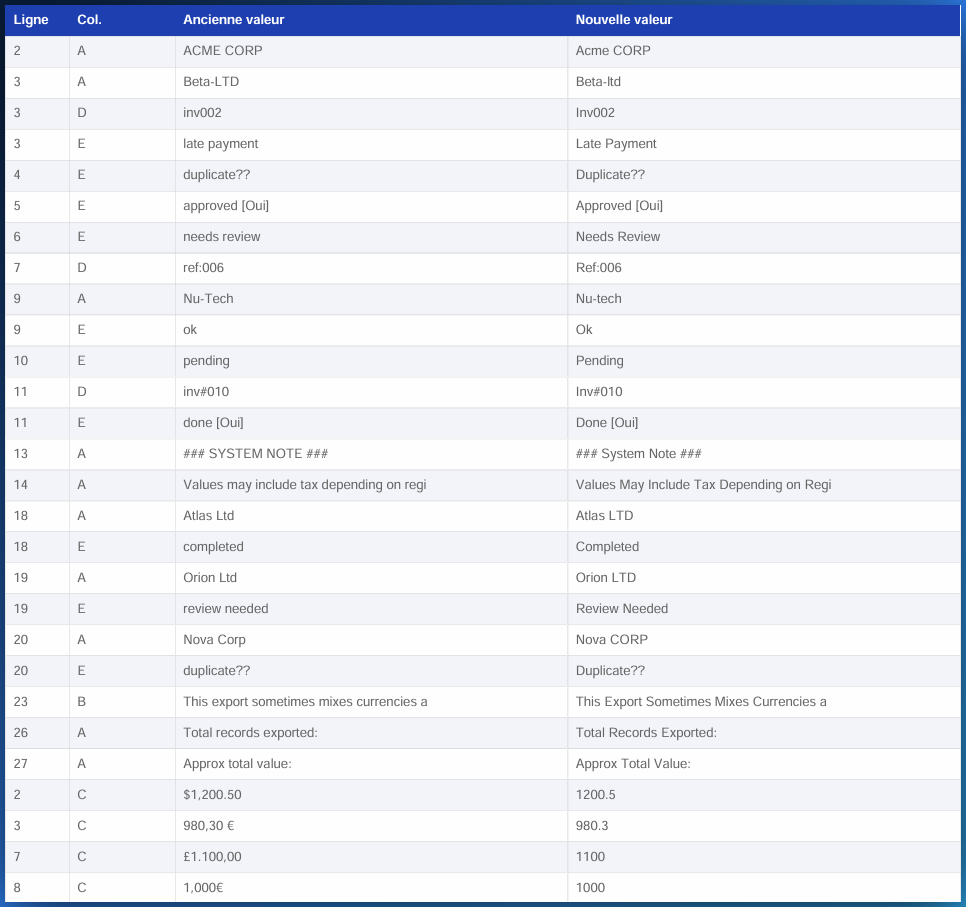
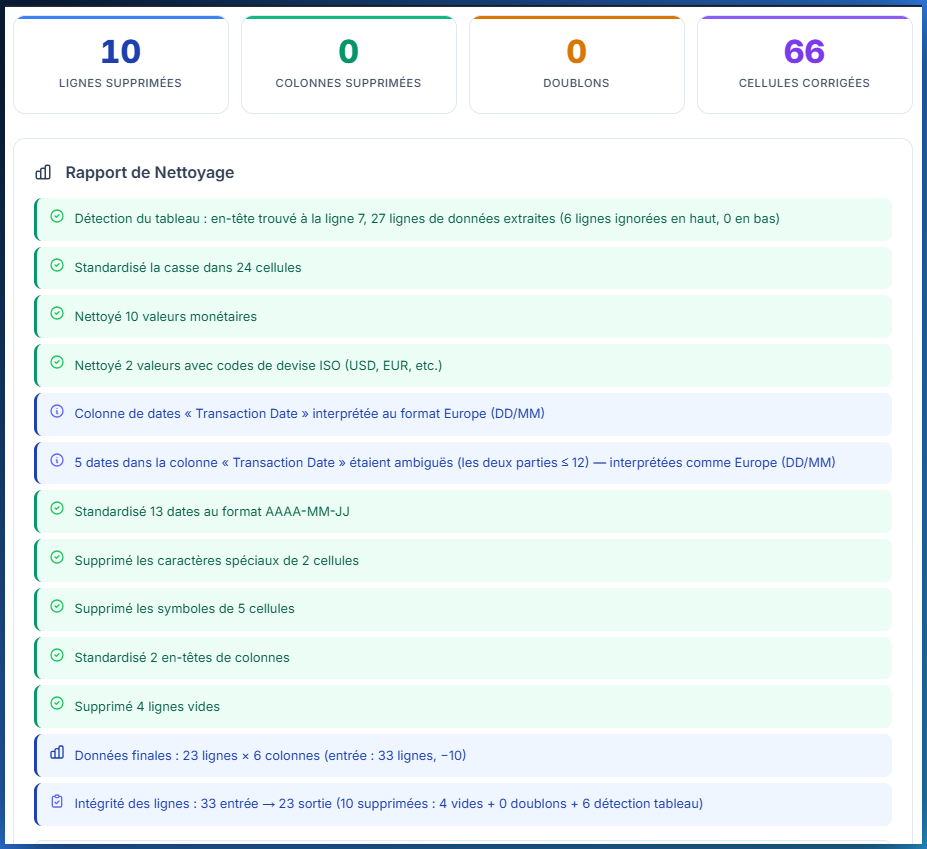
CleanSheet shows you exactly what changed, cell by cell, and why. You stay in control.

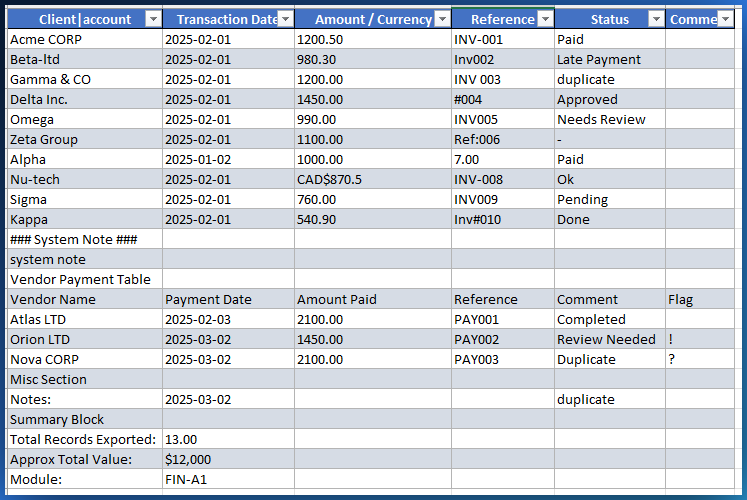
Before: Raw data
Before: messy raw data
After: Cleaned in 8 seconds
After: clean data
Cell-by-cell changes log
Every cell change is logged: old value to new value, with the reason why
Cleaning report
Full cleaning report showing exactly what was fixed and how many cells were affected
The Result

From 90 minutes of manual work to 8 seconds

Clean data ready for analysis, reporting, or import into QuickBooks, SAP, or any system.

8s
Total cleaning time
100%
Changes logged
0
Data sent to servers
4
Export formats

Who uses CleanSheetSmart?

Financial analysts

Clean ERP exports before loading into reporting tools.

Accountants

Fix bank statements, QuickBooks exports, payroll files.

Researchers

Prepare survey data and government datasets for analysis.

NGOs & government

Clean census data, compliance reports, donor records.

Pricing

Simple, fair pricing

One-time payment. No subscription. Free updates forever.

Free Demo

Free
  • Up to 100 rows
  • All cleaning features
  • Smart pattern detection
  • PDF & JSON export
  • CSV & Excel: Pro only
Try Free Demo Get Smart Pro
Data never leaves your device
Secure payment via Stripe
30-day money-back guarantee
Free updates forever
Get Started

Stop wasting time on
dirty spreadsheets.

Upload a file. Clean it in seconds. Download the result.
No account. No server. Just clean data.

Clean a File Now

Free demo · No sign-up · Works offline